Contents
In most plants the most important data is created on the machines, and the office learns about it only in the evening or the next day, from someone's head or from paper. When a machine reports by itself how much it has made, whether it is running or stopped and why, the guessing ends. Below, in plain language, is what this connection looks like and what a company gets from it.
Almost every manufacturer that outgrows spreadsheets hits the same wall. Orders are kept in Excel and on paper, and what really happens on the machines lives in the heads of the foremen. By the time that information reaches the office, it is already out of date. That is why deadlines are promised by feel and a stoppage is noticed only when it is too late.
What it actually means to connect a machine
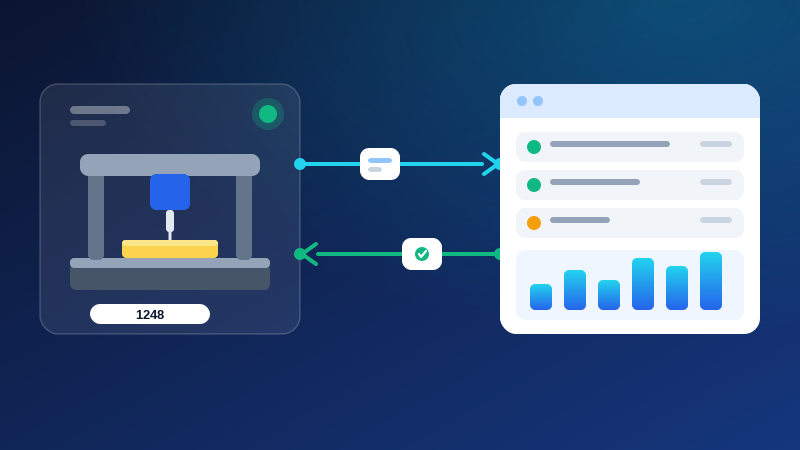
Many people think of expensive systems and replacing the whole plant. In practice it is simpler. Connecting means that software and machine exchange data, in both directions. It does not have to happen all at once and it does not have to be expensive. There are three levels, so a company chooses how much it needs:
- Read-only status. The system receives data from the machine, for example the piece count and whether it is running. The machine is not touched, only read.
- Sending orders. The system sends the machine what to make and how many, so there is no retyping and no entry errors.
- Full two-way link. The order goes to the machine, and the machine reports progress, stoppages and scrap in real time.
What the system sends to the machine
In the direction from the office to the shop floor, the system gives the machine the exact work order: what is being made, in what quantity, with which processing program, at what priority and for which deadline. Instead of the operator copying from paper or looking for the right file, they get a clear order on the screen next to the machine. There is less confusion, fewer batches made wrongly and less idle time between two jobs.
What the machine reports back
This second direction is what changes the picture most. The machine, or a sensor on it, reports what is really happening:
- How many pieces have been made, in real time.
- Whether the machine is running, stopped or being set up.
- How long a stoppage lasts and, where possible, for what reason.
- Scrap and key processing parameters, where the machine measures them.
When this data arrives by itself, the office does not have to call the shop floor to ask how far things have got. The order status is always accurate, because it is not typed in afterwards by a person but fills itself in while the work is being done.
What the company gets from it
Connecting is not a goal in itself. The value is that work becomes clear and decisions are made on data, not feelings:
- More accurate deadlines. You see the real progress of an order, so you tell the customer exactly when it will be done.
- Less idle time. A stoppage is visible immediately, not only at the end of the shift.
- A view of capacity. You know what the plant can really do, so you plan better and take on new work more wisely.
- Data for decisions. Within a few weeks it is clear where the real bottlenecks are, instead of arguing about it by guesswork.
You do not have to replace your machines
The most common brake is the fear that all this requires buying new machines. It does not. Older machines are connected through simple sensors and counters that count cycles or pieces. Where even that does not pay off, a small terminal stands next to the machine where the operator reports start, finish and stoppage with a few taps. Old and new work together, and the plant gets an overview without a big investment in equipment.
How to start
You do not start with the whole plant at once. You pick one machine or one line that has the biggest effect on the deadline, then connect and measure it. Once the benefit is visible on that part, the link is extended to the rest. That way the company sees a result early, before a big investment, and production is not stopped at any point.
Frequently asked questions
Can I connect old machines that have no internet?
Yes. Older machines are connected through simple sensors and counters, and where even that is not possible, a small terminal stands next to the machine where the operator reports start, finish and stoppage with a few taps. No new equipment has to be bought.
What exactly can a machine report?
Most often the number of pieces made in real time, whether the machine is running, stopped or being set up, and how long a stoppage lasts. Where the machine measures it, scrap and key processing parameters can be tracked too.
Do workers have to enter extra data?
The aim is the opposite. Where the machine reports by itself, the worker enters nothing. Where the machine cannot, entry is reduced to a few taps on a terminal next to the machine, instead of writing on paper and retyping into spreadsheets later.
Is this monitoring of workers?
No. It measures the process and the machine, not the output of individuals. The purpose is to remove idle time and spot bottlenecks so that work flows more easily, not to control people.
How much does it cost and how do we start?
It starts in phases, with one machine or one line that has the biggest effect on the deadline. Once the benefit is visible there, the link is extended further. That way the company sees a result before a big investment, and work does not stop.
How to see what it would look like for you
Instead of deciding on promises, the fastest way is to see it on an example. Describe in a few sentences what your plant is like and which machines you have, and we will build a custom clickable prototype in which orders travel through stages and the machine status is visible. It opens in the browser, with no installation. The data in it is made up, but the logic is real.
Build a free prototype for your plant
Describe your process and machines, and we will show you what a connected solution would look like.
Read more
See your data instead of reading it: from spreadsheets to a 3D view of your plant
When plant data becomes a picture: a table, a chart, a kanban or a live 3D view.
Clearer, more manageable, more efficient: how software and hardware together lift a business
Why software and equipment pay off only when they work as one system.
See the prototypes
Examples of custom solutions for manufacturing, wholesale and services.